
See what is breaking in your revenue cycle before it costs you money
Catch issues early, prioritize work clearly, and stay in control without digging through reports.
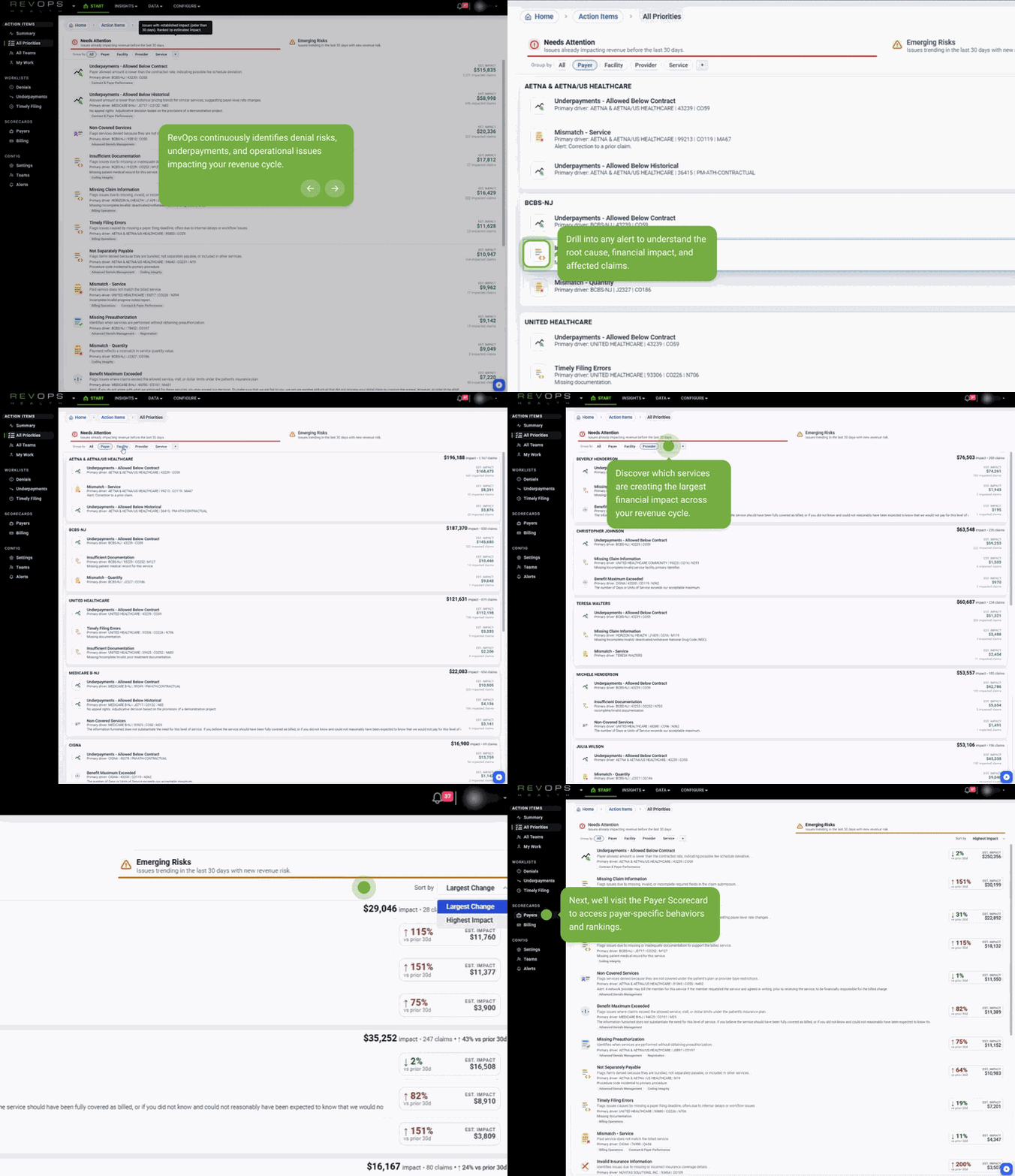
RevOps Health gives managers a live view of claims, remittances, and payer behavior so problems are surfaced automatically and ranked by financial impact.
Trusted by independent clinics, provider groups, specialty practices, and small to mid size hospitals across the United States.










Why managers use RevOps Health

Keep revenue flowing every day
Manage staff and vendors
Adapt to changing payer rules
Catch issues before money is lost
RevOps Health gives you early warning signals and clear direction on where to focus.
What RevOps Health helps you do
Find problems faster
Automatically surface missing claims, underpayments, and false denials without manual reviews.
Prioritize by impact
See which issues matter most based on real dollar exposure, not just claim counts.
Hold teams accountable
Track performance by payer, location, provider, or billing partner with clear metrics.

How it works

Connect your data
RevOps ingests claims and remittances automatically with no disruption to daily workflows.

Monitor continuously
The platform scans for anomalies, trends, and risks in real time.

Act with clarity
Issues are organized by priority so your team knows exactly what to fix first.
Operations & RCM Manager FAQs
-
RevOps rebuilds your revenue cycle view nightly using the latest claims and remittances, so you’re always working with current data. Beyond real-time visibility, the platform identifies historical patterns and trends, helping you recognize early warning signs before issues compound. This allows teams to act in the moment while understanding where today’s signals are likely headed.
-
RevOps launches with a built-in library of proven “watchers” developed across hundreds of practices, including underpayments, low pays, timely filing, authorization issues, non-covered services, coverage gaps, and more. The system also supports fully custom segmentation, allowing you to monitor patterns unique to your practice, specialty, or payer mix.
-
RevOps always pairs visuals with the underlying data and quantifies impact using expected revenue—not just billed or paid amounts. Expected value can be based on historical performance or loaded contracts, reducing debate and manual calculations. This allows managers to clearly communicate what an issue is worth and why it matters.
-
Yes. Once RevOps identifies a pattern or anomaly, it tracks that issue historically and continues monitoring it after operational changes are implemented. Improvements, regressions, and re-emergence of issues are automatically visible, with alerts in place to notify you if a resolved problem starts to return.
-
RevOps is built around transparency. You can analyze and compare payers, vendors, facilities, and internal teams against themselves or one another across any time period. This makes it easy to understand where performance differs, quantify impact, and have data-backed conversations about accountability.
-
RevOps replaces manual aggregation, static reporting, and people-powered surveillance. It is not an accounting system and does not replace financial reporting for expenses or margins. Instead, it automates data blending, reporting, search, and auditing across claims and remittances, allowing teams to focus on analysis and resolution rather than assembling data.
-
Very little. RevOps handles the heavy lifting during implementation, provides training resources, and avoids pulling operational staff away from their work. We simply need credentials to access your data, and our team manages ingestion and setup—often with one or two short calls, or none at all.
-
No. RevOps is a read-only system, similar to adding GPS to your car—it improves how you navigate without changing how you drive. While insights may lead to workflow improvements, there are no required process changes to begin using the platform and seeing value.
-
Most customers are live within 48 hours, often much sooner. Once credentials are provided, historical data is loaded and the system is ready for use—frequently within hours.
-
Today, RevOps ties issues to payers, service codes, CARCs/RARCs, and other operational dimensions to clearly define what’s happening and where. We are actively expanding ownership features to connect issues to people and projects, enabling managers to track work at the individual level while reporting up on broader operational trends.

Stay ahead of revenue problems
Know what is happening, why it matters, and what to do next.